


Background Information
When tracking satellites using a beacon receiver, the -3dB Beamwidth in degrees is a very important parameter for the system. Almost all of the calculations performed when optimizing signal strength are based on this parameter. The more accurate this parameter, the better the system will perform. By default the parameter is populated using the theoretical calculation for the -3dB Beamwidth which is 70 D where λ is the wavelength of the signal in meters and D is the diameter of the parabolic dish in meters.
• λ = velocity ÷ frequency
• λ = speed of light m/s ÷ (Frequency in MHz) x 1000000
• λ = 299792458 ÷ (Frequency in MHz) x 1000000
The 70 in the equation is a constant representing a generally accepted value. Some people incorrectly call this efficiency of an antenna but it is not related to efficiency. What one finds is that the less perfect the antenna the lower this number will be in value.
Potential issues could be associated with:
- Panel misalignment
- Clamshelling
- Sub-reflector misalignment
- Waveguide or feed issues
Equipment Required
To perform a -3dB beamwidth measurement, you will need the following equipment:
- Antenna Under Test (AUT): The antenna for which the 3dB beamwidth is to be measured.
- Spectrum Analyzer: To measure the received power.
- Radeus Labs ACU: A device capable of precisely controlling the movements of the AUT in azimuth and elevation.

Setup Procedure
- Schedule Downtime: Doing this measurement will cause the signal to drop significantly so it is best to not be carrying traffic during this test.
- Target selection: Find a target that is well station kept, meaning the target has an Inclination of less than 0.1°. This is important because as you are running the test in both AZ and EL you don’t want the target to move and distort the data.
- Attach the Spectrum Analyzer: Even though one could use the beacon receiver it would be better to use a spectrum analyzer.
- Access the sheet we have created for you here.
Measurement Procudure
- Initial Scan (Peak Power Detection):
- Set the Spectrum Analyzer to the desired operating frequency of the target.
- Rotate the AUT using the ACU over a degree range covering the expected main lobe and 1st set of side lobes to confirm the AUT is on the peak, in both AZ and EL.
- Identify the angle in both AZ and EL at which the received power is at its maximum. This will take some time for the signal to settle, turning on averaging on the Spec-An will help with unstable signals. This is the boresight or peak of the main beam. Record this maximum power level Pmax and the corresponding Beam Center angles AZ_BC and EL_BC.
- Calculate P3dB by subtracting 3 from PMax
- Scan for -3dB Points:
-
-
- Starting from the pointing angles AZ_BC and EL_BC, rotate the AUT in the EL up direction until the received signal is P3dB. This will take some time for the signal to settle, turning on averaging on the spec-an will help with unstable signals. Record this angle as EL_UP.
- Return to the pointing angles AZ_BC and EL_BC, and confirm that signal strength returns to Pmax. Then rotate the AUT in the opposite direction, EL down, until the received signal is P3dB. This will take some time for the signal to settle, turning on averaging on the spec-an will help with unstable signals. Record this angle (EL_DW).
- Return to the pointing angles AZ_BC and EL_BC, and confirm that signal strength returns to Pmax. Then rotate the AUT clockwise in AZ until the received signal is P3dB. This will take some time for the signal to settle, turning on averaging on the spec-an will help with unstable signals. Record this angle (AZ_CW).
- Return to the pointing angles AZ_BC and EL_BC, and confirm that signal strength returns to Pmax. Then rotate the AUT counter-clockwise in AZ until the received signal is P3dB. This will take some time for the signal to settle, turning on averaging on the spec-an will help with unstable signals. Record this angle (AZ_CCW).
-
Data Analysis and Reporting
- If you have been entering the data into the sheet we provided, it will automatically calculate the 3db beamwidth which can be entered in the target menu under Beamwidth (deg).
- If you are not entering the data in the sheet, you must manually calculate:
- 3dB Beamwidth
- EL = EL_UP - EL_DW
- AZ =

- Next you average the AZ and EL 3dB Beamwidths together for the targets -3dB Beamwidth
- 3dB Beamwidth
NOTE: If the AZ and EL -3dB Beamwidths are different by more than 25%, Radeus Labs’ recommendation is to review the path of the target in the sky from your perspective and give 75% weight to the primary axis of motion for the anilemma.
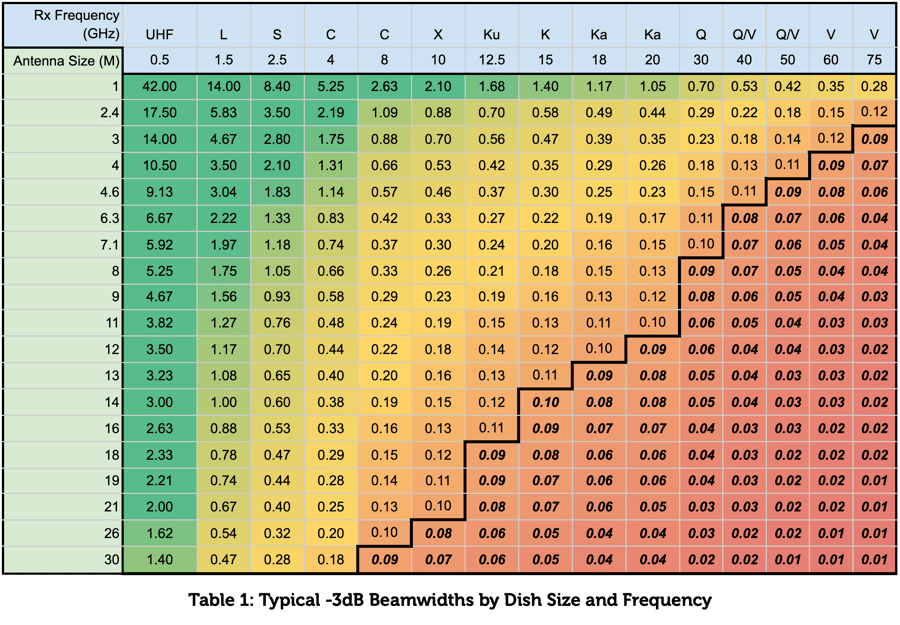
Use the table below as a reference for expected -3dB beamwidths based on dish size and frequency.